Archive for December 2009
Random Notes From Online Educa 2009
My blog, as one of the preferred outsourcing partners of my mind, will serve as a keeper of some of my notes and thoughts on Online Educa 2009 in Berlin. This will be a relatively disorganised post with a lot of different short bits of information, apologies in advance.
Blog posts
Earlier, I wrote a couple of blog posts about this year’s Educa:
- Will it Blend? A Presentation at Online Educa 2009
- Open Source: Getting Failure for Free (Online Educa 2009)
- Did You Know Moodle 2.0 Will….? (Online Educa 2009)
- Mobile Language Learning with Learnosity (Online Educa 2009)
- Online Educa’s Platinum Sponsor Fronter is a Closed Source Proprietary Product Part 2
Twitter
I used Twitter a lot this year trying to capture some choice quotes and thoughts. Twitter does not give you an easy way to show all your posts with a particular hash tag (why not?), so you can view my past tweets through Tweet Scan. Here are some highlights:
- Atkins: “Girls are using technology to get better, boys are using technology to get into trouble. Not that I have a gender bias.” #oeb2009, 2009-12-03 09:51:55
- The new comments API is probably the most welcome new feature when it comes to strengthening #Moodle pedagogy. #oeb2009 2009-12-02 15:19:59
- Jon Husband: “When you implement an ERP system you are putting electronic concrete on your business processes.” #oeb2009 2009-12-03 11:16:35
- Thanks @jonhusband for this article: http://www.theatlantic.com/doc/199910/information-revolution. #oeb2009 2009-12-03 11:21:29
- I had never heard of Aric Sigman before. Good to hear from somebody who sits completely outside my belief system once in a while. #oeb2009 2009-12-03 17:10:38
- Ok, promise to self: Only attend presentations of true stars and use the rest of the time for talking to interesting people. #oeb2009 2009-12-04 12:12:56
I wasn’t the only person tweeting at the conference. The tag was #oeb2009 and Twubs provided a nice hub.
Making the switch from Blackboard to Moodle
Alex Büchner from Synergy Learning talked about organisations switching from Blackboard to Moodle. He gave three reasons for making the switch:
- Moodle is a better product.
- Staff and students prefer to use Moodle over Blackboard (see this report).
- Moodle has a lower Total Cost of Ownership (see this report).
Alex made a lot of people laugh with his graphic showing how Blackboard is gaining market share through acquisitions and how Moodle still manages to trump that:
Brochures that I picked up
There were a lot of exhibitors all handing out brochures. These are the companies/services of which I kept the brochures:
- CELSTEC, the Centre for Learning Sciences and Technologies. This Centre of Expertise is part of the Dutch Open University and does a lot of original research in the technology space. I would love to explore how I could work with them in the future.
- Quick Lessons. I like how this company has all the right buzzwords in their marketing: they allow you to do “rapid e-learning development in the cloud” (!). They even have the famous Web 2.0 badge on their site. There is one thing I really like though: the concept of a web-based development tool. I do think there is a lot of potential for those, regardless of whether Quick Lessons is the best option. Does anyone have any experience with using Udutu for example?
- The market for capturing presentations is maturing. A presentation or a lecture might seem old-fashioned to some, but there still is a space for this type of teaching (if it is well done) and by filming the lecture, you can turn this into on-demand content for students. Through my work at Stoas Learning I already knew about Presentations 2 Go, but I hadn’t heard of Lecturnity before.
- The rapid browser-based sims of Thinking Worlds are very interesting to explore further. A little while ago I did a course which used a game developed with their 3D engine and I thought it had a lot of potential. Their worlds run in the browser and only require a Shockwave plugin which should be available on most systems. What I really want to know is how quick and easy the authoring process is. How do you design interactions and scenarios? I will check that out in the near future.
- Geanium delivers “Interactive Chronological Visualisations”, another word would be timelines. Their product looked nice enough: you could put events not just on a timeline, but also on a particular place in the world. I can see some niche applications for this service.
- I have quite a bit of experience in using Adobe Captivate to do rapid development. I like certain things about the software, but would be interested in finding out how it really compares to the other rapid development tools from Articulate (check out the excellent Rapid e-Learning Blog by the way) and TechSmith (of SnagIt, Camtasia and Jing fame). The latter has a new product out called UserVue, which could be very useful in usability testing. I wish I would have easier access to installed trial versions of these applications.
Lord Puttnam and We Are The People
Lord Puttnam keynoted on the first day. He talked about his latest video project titled We Are The People We’ve Been Waiting For. The basic point of the movie is that we are not preparing our children for the future that is waiting for them. You can get the DVD you for free when you order it online. I ordered and watched it and thought it made a good case for making a step change in our educational system. My favourite talking head in the movie was Ken Robinson. If you have never seen his TED talk, then you should rectify that situation immediately.
An unconference with Jay Cross and his Internet Time Alliance friends
Jay Cross organised a couple of unconferences with his Internet Time Alliance friends. I always admire Jay for how he manages to utilise the Internet to his and his clients advantage. His self-published “unbooks” are a great example of this. His sessions were by far the most interesting and engaging at this year’s Online Educa. Jane Hart and Charles Jennings were in the room and Harold Jarche and Jon Husband were available through video conferencing.
The main question of the session that I attended was: What are the major challenges/vision/issues that we see moving into the 21st century when it comes to learning? Jarche thinks organisations will have to deal with more and more complexity. Everything that is simple or can be commoditized will move to the lowest bidder or will be an automated process. What is left is complex. The training functions are currently not able to deal with this complexity. Cross considers the global downturn a symptom of the end of the industrial age and the beginning of a truly networked world. In that world intangibles are much more important than tangibles. Our training metrics will have to change to reflect this.
Then followed a selection of models and ideas that are mostly familiar to me, but are valuable enough to share again:
- A hierarchy of employee traits in the creative economy: passion, creativity, initiative (these cannot be commoditized) followed by intellect, diligence and obedience (all of these can be commoditized).
- Jane Hart’s five types of Learning: Intra Organizational Learning (self-directed, organizational), Group directed learning (self-directed, group), Personal learning (self-directed, individual), Accidental & Serendipitous learning (undirected, individual) and Formal structured learning (directed, individual). These are interesting in that they show that they are other ways of delivery than the traditional face to face workshop, but they start at the wrong end of the learning question. I would like to start on the demand side when it comes to creating a learning typology (actually I am working on exactly that: a corporate learning typology, more to come).
- The concept of the wirearchy: a dynamic two-way flow of power and authority based on information, knowledge, trust and credibility, enabled by interconnected people and technology.
- John Husband shared this great paragraph from Peter Drucker (the full text is here):
Bribing the knowledge workers on whom these industries depend will therefore simply not work. The key knowledge workers in these businesses will surely continue to expect to share financially in the fruits of their labor. But the financial fruits are likely to take much longer to ripen, if they ripen at all. And then, probably within ten years or so, running a business with (short-term) “shareholder value” as its first—if not its only—goal and justification will have become counterproductive. Increasingly, performance in these new knowledge-based industries will come to depend on running the institution so as to attract, hold, and motivate knowledge workers. When this can no longer be done by satisfying knowledge workers’ greed, as we are now trying to do, it will have to be done by satisfying their values, and by giving them social recognition and social power. It will have to be done by turning them from subordinates into fellow executives, and from employees, however well paid, into partners.
- The wonderful Cynefin framework. This models describes five different problem domains and the best ways to manage situations in these domains. Reading Snowden’s original Harvard Business Review article is well worth the price and the effort.
Accelerating the Adoption of Innovations
I had a great round-table discussion with Ellen D. Wagner from Sage Road Solutions (kudos: the first business card with a Twitter name that I have received, maybe pretty standard in the valley?), David James Clarke IV from Toolwire and others about how to accelerate the adoption of innovations.
Wagner wanted to overlay Gartner’s Hype cycle over Rogers’ adoption curve. Gartner’s hype cycle looks like this:
Rogers’s adoption curve is as follows:

Diffusion of Innovations
Wagner puts these two graphs together:
She shows exactly in which phase the pain lies and where extra stakeholder support is necessary. The whole discussion reminded me of this great Geek and Poke comic:

Gartner Hype Cycle Version 2.0 by Geek and Poke, licensed under a Creative Commons Attribution-NoDerivs 2.0 License
David James Clarke IV and Experiential Learning
David James Clarke IV of Toolwire also presented on experiential learning in a plenary. His argument was that in the current information economy knowledge is not power anymore. It is access to knowledge and the ability to turn that knowledge into action and decisions that is power.
He talked about the tension between richness (the depth of the experience) and reach (the amount of people the experience can reach) as first described by Evans and Wurster which, if adapted to the traditional educational field, leads to the following tension between classroom (high richness, low reach) and distance (low richness, high reach) learning:

Richness - Reach tension
His point is that technology is now at a point where this tension can be overcome:

Technology overcomes the Richness - Reach tension
This is where experiential learning comes in. Students should have hands-on real world experiences while they are in school. He finished his talk with an example from the Matrix. I quote from the white-paper that he and Charles Jennings wrote on experiential learning:
The movie The Matrix provides an exceptional example of experiential learning in action. In this case, it is literally a matter of life or death. In a scene towards the end of the movie, our heroes – Trinity and Neo – find themselves trapped on the roof of the Agents’ headquarters. Their only escape is via a military helicopter.The problem is neither of them knows how to fly a helicopter … yet. So what does Trinity do? She calls her Learning Management System (LMS), of course. In this case, the LMS is represented by a phone operator named Tank.Trinity requests a specific learning object – Helicopters for Dummies! – and Tank downloads the skills directly into her brain. You can appreciate the experiential learning significance here. Once Trinity has received the skills, she and Neo fly the Helicopter to safety and continue saving the world!This is a perfect example of just-in-time, context-sensitive experiential learning delivered exactly when the student needs it … in 30 seconds!
Clarke later in the day did a Pecha Kucha with 10 movies about learning as his topic:
I have decided that I will invest some time into creating my own Pecha Kucha: a top ten of education philosophers.
Niall Winter: a Framework for Designing Mobile Learning Experiences
Niall Winter is an interesting researcher at the London Knowledge Lab. He talked about the fact that mobile learning has failed to exploit the social practices by which the new affordances of mobile devices become powerful educational interventions. He sees designing mobile learning experiences as one of the key challenges for the technology enhanced learning community. It important to focus on the learning intervention and not be techno-centric. This should lead to socio-technical solutions where the context and the activity determine the success. His goal then is to design activities that are appropriate to the context.
He does this using a participatory design methodology going through the following time consuming process:
- Explore the institutional context: technology, identifying existing practice, participants’ perspective
- Explore the learner context: scenarios, concerns, (un)expected new practices (iterative cycle)
- Deploy and go through the cycle again
The host of Niall’s session, Herman Van der Merwe, introduced the audience to the International Association for Mobile Learning.
Two final interesting links to explore in the future
- LANGblog is an open source adaption of WordPress Multi-User and is ideal for letting people without a lot of technical knowledge do audio-centric blogging.
- Thomas Michael Power talked about new ways of teaching Geomatics. He is part of the GeoEduc3D project which aims to design mobile educational games based on geospatial technology.
Final conclusion
All in all it was very worthwhile to go to this year’s Online Educa. I don’t think there is another occasion where that many members of the educational technology community are present.
Online Educa’s Platinum Sponsor Fronter is a Closed Source Proprietary Product Part 2
The 2008 Online Educa in Berlin was the first time I saw Fronter’s appropriation of the term “open source” for their own marketing gain (they are not the only company looking for some open source street cred). At that time I wrote an irate blog post that got a bit of attention, but never a reply from Fronter itself.
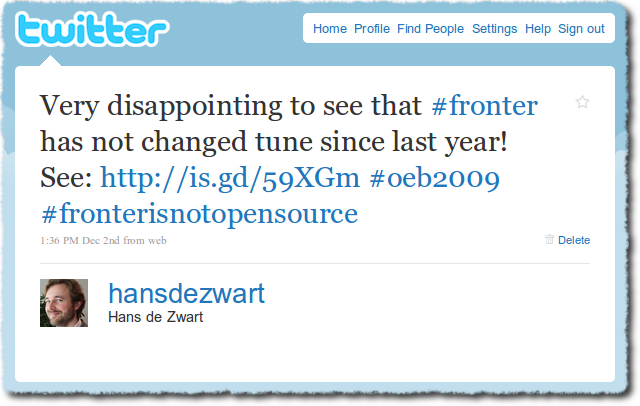
It wasn’t surprising to see that Fronter did not change its ways for this year’s Online Educa. I wrote the following tweet:
My slightly provocative attitude had its effect and Fronter’s CEO Roger Larsen send me an email asking to meet with him. We had a quick chat at the Fronter stand.
He asked me what it was that I didn’t like. I explained that I don’t mind a proprietary business model for software (you can sell the software you create in any way you see fit), but that I have a problem with his misleading language in his marketing materials.
According to him it has never been his intention to mislead his customers. He is not sure of what he has done wrong as he has used the term “open source” for his software in his marketing materials for over ten years now. It has only been in the last three years that the open source movement has hijacked the term open source and given it a specific meaning.
I then told him that the Open Source Initiative (OSI) started in 1998 and that the first version of the GNU General Public License (GPL) came out in 1989. I pointed out the parts of their brochure that I thought were misleading and offered him my help in ensuring that the next iteration of the brochure would not make incorrect use of the term open source. He gracefully accepted that offer.
I leave it up to the reader to judge whether his innocence is genuine. I myself will judge that at next year’s Online Educa.
Mobile Language Learning with Learnosity (Online Educa 2009)
About one and a half years ago I listened to a Floss Weekly podcast about the open source telephony project Asterisk. Asterisk is an incredibly flexible and powerful piece of software. Many projects are using the software in very creative ways. E.g. an interactive telephone murder mystery, a plant care system, a slightly offensive booty call service, the ability to create your own conferencing rooms, interactive big screen cinema controlled by phone input, and so on.
Since then, I have always thought that an e-learning company at the leading edge of technology would be able to do great things with Asterisk as the motor. Enter Learnosity, an Irish company that is using Asterisk to enable their language teaching services.
Gavin Cooney, Learnosity’s CEO, gave a very smooth and entertaining presentation (on the edge of a sales pitch) at this year’s Online Educa. His company has been commissioned by the Irish government to help in the educational battle to save the Irish language. They have created a mobile learning solution that can work with any type of cell phone.
I have been a teacher in secondary education for many years and know that it is hard for language teachers to get their students to actually practice speaking the language. Computer based instruction has been very promising in this respect for many years. The logistical requirements (all students a computer, headphone and microphone) have so far limited its use.
Learnosity has taken a different approach. Doing language exercises is as simple as using your cellphone, dialling a number, typing a student number and pin and then responding to the questions that you are being asked. The system will record all the answers and make them available in a web interface for the teacher. The teacher can listen to the exercises and give feedback which the student can then view on the web or on their smartphone.
It is also possible to let the system set up conversational exercises for a group of people. This is quite impressive. Imagine a classroom with 26 students. The system makes pairs and calls each of the students. Partners get symmetrical instructions. E.g. one student is told the following: “You are in Paris and have to ask directions for the Eiffel tower”. The partnering student will then hear: “You will be asked for directions to the Eiffel tower, please give them”. The conversation is stored on the web and can easily be replayed and commented on by the teacher.
It is great to see such a young company with this amount of ambition and flair! They seem to innovate continuously and will benefit from real teachers with pedagogical insight helping them. If I were a language teacher I would not be able to wait to try things out…
Did You Know Moodle 2.0 Will….? (Online Educa 2009)

Martin Dougiamas spoke about Moodle 2.0 at the 2009 Online Educa in Berlin. Photograph by David Ausserhofer and licensed under a Creative Commons Attribution 2.0 Germany License.
I have written about Moodle 2.0 before. But last week in Berlin I had the opportunity to attend two more presentations by Martin Dougiamas about the plans for the next major version of Moodle and I have gotten a better idea of how things will work.
Moodle.com is completely transparent about their plans. You can read the roadmap and view the latest version of the planning document at any time. 16 developers are in Prague right now, making sure all of this will actually happen (search for #moodledev09 on Twitter).
My overview below is not complete. It is just some of the things I thought were interesting. Here we go! Did you know Moodle 2.0 will…
- …look much better. The way that themes work will change completely. This will allow for much more flexible templating and theming. Moodle has Patrick Malley as the theme coordinator. He has been commissioned to create 20 beautiful themes that will ship with Moodle 2.0. Moodle will not ship with any of the old themes. The old icons will be replaced with a new set based on the Tango guidelines. All of this is great news as most Moodle sites do use the default themes (see this 12.6MB image of registered Dutch Moodle sites for examples).
- …break most things. The 2.0 release is seen as the chance to do things differently. A lot of code will be refactored. There will be a smooth upgrade from 1.9 to 2.0 for the core code, but any customisations and extra modules will more than likely need an update. Examples? Every designed theme will need to be updated, 1.9 backups will probably not restore in 2.0 (update: there is a workaround) and old ways of getting files into the system (FTP anyone?) will not work anymore.
- …allow you to search for Flickr images with a particular Creative Commons licence and will add the license to the image itself. This is one of my pet favourites, because it shows how anyone who is willing to be part of the dialogue around Moodle development (regardless of whether they are a developer or not) can influence the feature set of Moodle. I created a request for this feature in the Moodle Tracker and Martin demoed it in both his presentations in Berlin. We still need to get the user interface right, but the functionality is there.
- …have the concept of a finished course. In current versions of Moodle there is no way to let the system know that a particular learner has finished the course. The concept just doesn’t exist. A lot of people require this functionality. It could be used as a trigger for sending the course grade to some other system, or could trigger the creation of a certificate.
- …allow for conditional activities. In 2.0 you can make the availability of activities and resources for a particular learner dependent on certain conditions. These conditions could be the completion status of a particular activity (what completed means depends on the type of activity) or a grade for a particular activity. Finally it will be possible to set up your course in advance and then let it run by itself! No facilitation required! If Skinner is still your educational philosopher of choice, you will be very happy with this functionality! On a more serious note: this will allow for even more flexible Moodle course setups and that is never a bad thing.
- …import external blogs. I believe blogging should be done on a platform that is as open as possible. This way your audience can be as large as possible and that means the interactions and dialogue around your blog will be at its most valuable. This is the reason why I don’t use the internal blogs that my employer provides me with and why I don’t have an active blog on Moodle.org or on any other Moodle installation. Not only will Moodle have a proper RSS feed for your internal blog, it will also allow you to import an external blog (based on a feed URL and on tags) and make it available internally. Moodle will make sure that the posts are in sync: so if you delete a post on your internal blog, it will also be removed from your internal blog. Brilliant!
- …have a decent HTML editor that works in more than two browsers. HTML Area, the HTML editor that current versions of Moodle use, is old and crusty and does not work in many browsers. Moodle 2.0 will integrate TinyMCE, an HTML editor that has a larger and vibrant development community. It will work on Internet Explorer, Firefox, Safari, Opera and Chrome/Chromium. All Moodle users will really appreciate this change (even if they might not be aware of it).
- …allow comments on everything. This is the pedagogical big winner for me. It is possible to add a comment block to nearly every resource/activity in Moodle 2.0. This will allow for a lot of peer feedback which can then be aggregated in different places (in the course, in a users profile?). I recently did a course on Rapid e-Learning Design where one of the core activities was commenting on other people’s work. The richness of interaction that this created was amazing. I am just hoping that the development team will think real hard about some of the user interface decisions around the comment API: that will make all the difference.
- …have a workshop module that you are not scared of using. Currently the workshop module is broken. I would not recommend anybody to use it. The peer feedback concept that it embodies is not broken though! David Mudrák has completely rewritten the workshop module and the first comments are very positive.
- …will have a built-in feedback/survey module. Modules that implement survey functionality in Moodle have always been the most popular add-ons. Andreas Grabs’ Feedback module will become part of the Moodle core code from 2.0 onwards.
- …will not eat disk space if a file is used or uploaded multiple times. We all know the problem. You have a course that has a 300MB presentation in it. The course is duplicated for another run. Now you have two courses with 600MB of presentations. This problem is a thing of the past in Moodle 2.0. All information about files and where they are used is stored in the database (drastically improving the security around who can access a particular file). The files itself are stored on the filesystem. A SHA-1 check on each new file will make sure that identical files are not stored twice.
- …have a completely new way of navigating. The way users navigate a Moodle installation has gotten a complete rewrite. Tim Hunt has done a very commendable job involving the community in his design plans and there is an excellent page in the Moodle Docs explaining what it is going to look like. It boils down to a more consistent navigation bar, a new Ajaxy navigation block which allows you to jump to any resource/activity in any of your courses in one step and the moving of many of the module related settings that were hovering at the top right corner of the page to the administration block.
- …be a reinvention of itself as a platform. Moodle was approaching the end of its life cycle as a “Walled garden” product. Moodle was ahead of the game in 2001, but has been passed by many of the developments on the Internet since its inception. When Moodle was first conceptualised things like WordPress MU, Ning, Flickr, Delicious and Wikipedia did not exist. Moodle needed to reinvent itself. The repository and portfolio APIs in combination with the Web Services layer will allow Moodle to become much more a platform than an application. Moodle will keep its relevance or will become relevant again (depending on your viewpoint on the state of educational technology). I am already imagining the Moodle App Store.
- …change the world of education (if nothing else). I think that Moodle already has had a very positive impact on the world of education, but if the Moodle Hubs scheme works, it will be a lot easier for teachers to share the share their best practices and collaborate with other teachers the world over.
I am certainly looking forward to its release! Are you excited yet?
Open Source: Getting Failure for Free (Online Educa 2009)
On the last day of the Online Educa I did a talk titled “Open Source: Getting Failure for Free (and Why That is a Good Thing)”. Whenever I talk about open source it is like preaching to the converted: no sceptics in the audience. The two other speakers in the “The Added Value of Open Source Solutions in Times of Crisis” session were pretty hardcore. Matteo Uggeri was wearing a “I do not work for Fronter” badge and Elias Aarnio prefers to talk about “Free Software” and did not use the proprietary laptop that was available to do the presentations.
In my talk I tried to explain that cost should not be the only reason for choosing open source software. Another reason to use open source software is the fact that it will allow you to innovate faster. The slides are available on Slideshare and below:
A special thank you to Alex Wied, senior manager at Accenture who kindly allowed me to use some of his slides in this presentation.
Will it Blend? A Presentation at Online Educa 2009
This morning I presented in the “The Moodle Experience: Moodle in Practice and New Developments” pre-conference session at the Online Educa in Berlin.
My talk was titled “Will it Blend” and the slides are available on Slideshare and below (no audio unfortunately). If you have any questions about these slides, don’t hesitate to ask them in the comments.
On Friday (14:30-16:00 in room Lincke) I will talk about the use of open source software in corporations. My talk is titled “Open Source: Getting Failure for Free (and Why That Is a Good Thing)” and is part of the “The Added Value of Open Source Solutions in Times of Crisis” session.
I do hope to meet readers of this blog there!
A Design Concept For a Mobile Moodle Application
Arjen Vrielink and I write a monthly series titled: Parallax. We both agree on a title for the post and on some other arbitrary restrictions to induce our creative process. For this post we agreed to create a design concept for a mobile Moodle application. The concept should include screen mockups. You can read Arjen’s post with the same title here. This month we are delighted to have two guest writers writing about the same topic. Marcel de Leeuwe (read his post here) and Job Bilsen (his post can be found here).
Mobile applications have taken off. This is largely due to the trailblazing work that Apple has done with the iPhone and the App Store. If you have been watching my Delicious feed, you will have noticed that I too have succumbed and will be part of the iPhone-toting crowd (I will write more about me losing my principles later).
Nearly every web service that I use has a mobile application. Examples are Last.fm, Flickr, WordPress, Dropbox, NY times, Paypal and more, the list is endless. Moodle, the web application that I use most often, does not have a mobile app yet. There have been a couple attempts at creating themes that display well on a mobile (such as here). These mobile themes usually try to deliver all of Moodle’s functionality, which often limits their phone specific interaction and their user friendliness. Other applications use JAVA applications that gives people access to specific Moodle functionality (examples here and here).
It would be great to have a true mobile Moodle application. Here are some initial thoughts for a design.
Audience
The audience for this Moodle application would mainly be students/participants. I want the functionality to focus on things that are easily delivered on a mobile platform. I don’t think grading and reporting interfaces lend themselves well to a smaller screen. The things that people like to do with a mobile device are usually: seeing what has happened/is happening, plan and communicate. This Moodle application will enable the users of a Moodle installation to do exactly those things.
Getting rid of the course paradigm
Moodle is extremely course centric. I have always thought that this has some great advantages, mainly that all the learning is very contextual. Students, however, often have to “multi-course” (doing multiple courses at the same time). A mobile application should make the most urgent or current events, actions and resources bubble to the top. This requires the application to get rid of the course paradigm and show a personal page per user.
People that have used Moodle for a while might know of the “My Moodle” page. This page also tried to pull up the most relevant information for a particular user, but would still display this information on a course by course basis.
This application will consist of four main screens. Each screen has its own icon at the bottom of the screen that stays available at all times. Each screen could of course lead to other screens that take you deeper into the Moodle installation.
1. Recent activity stream
Facebook and Twitter have really taught us the use of activity streams. These pages display short status messages about what is happening in reverse chronological order. Moodle has had an activity stream since its inception: the recent activity block. This block shows what has been happening in a particular course. Examples are forum posts, work being handed in or materials being added by the teacher.
This screen will work in a similar way, but will include all the courses a user is participating in. I would imagine that each update on the screen would include a date and a time, would link to an extended version of the update and would include a user image if the update concerns another user, or an activity icon if it concerns a particular activity. The newest updates would be at the top of the screen and the user would be able to scroll down to see older entries (very similar to Twitter). See below for an example:
You would have to think about each Moodle module and decide what a status update would look like for that particular module. Some examples of events that could trigger a status update:
- A forum post is added to a course of which the user is a member.
- An activity becomes available (either because it was added or because it had certain time that it would become available, like the choice or assignment activity) or a deadline has passed.
- An entry is added to a database activity or a glossary that the user has access to.
- A topic or week has been made current by the teacher/facilitator.
- A message has been sent to the user.
- The user hands in work for an assignment, fills in a choice, starts a lesson, gets the results for a quiz or starts a SCORM object.
- A change is made to a wiki page that the user has access to.
These status updates could announce themselves on the home screen in a similar way to how the mobile platform shows that you have new email messages: by showing how many new updates are available.
2. Upcoming events
This screen is also an extension of existing Moodle functionality made course independent. Conceptually it is what you would see if you would scroll up on the recent activity screen. Upcoming events that can be displayed are:
- Anything that is in the user’s calendar.
- Activities that will become available or that have a deadline.
- Courses that will start and that the user is enrolled in.
This screen would look very similar to the “Recent Activity” screen as shown above.
3. Social: contacts, interests and messaging
A mobile device is used for communications and a mobile Moodle application should facilitate that. This screen is an alphabetical list of all the users that a student/participant shares a course with, combined with an alphabetical list of all the interests that a user has put in their profile and all the courses the user is enrolled in. See example:
Selecting a user will take you their profile page. This page will focus on the ways that the user can be contacted. You can message the user from here, call (or Skype) them, send them an email and click on the links to their external websites (a blog, Twitter, Facebook, etc.). See this example:
Selecting an interest or a course will apply a filter to the alphabetical list. It will now only show users that share this interest or this course. It might allow the user to contact all these users in one go (if this role has been given the permission for this capability).
4. Browsing courses, activities and resources
I really like a side scrolling drill down navigation (examples are the way that email works on the iPhone or the “Slider view” on Grazr). A mobile Moodle application should allow the user to navigate to activities and resources in their course by constantly drilling down. This can be done it two ways: course centric or activity-type centric. The application should probably support both.
The first screen shows a list of all the courses the user is participating in and below that a list of all the activity types that exist in Moodle.
Clicking on a course will make the previous screen slide to the left and display a new screen. The first option on this screen will be called “Course overview”. If you click on this you will see all the section/topic summaries, all the activities and resources and all the labels in their correct order (blocks are completely ignored in this mobile application). Below the course overview are links to the overview pages of each activity type. Clicking these will display all the instances of a particular activity or resource.
If you click on an individual activity or resource you will be shown that activity (again by making the screen slide to the left). What is shown here and what interactions are possible is dependent on the activity module. The minimum it would show is the title and the description. This would probably be the case for SCORM modules for example or for “upload a file” assignments. You would not implement a mobile SCORM player, nor will people likely have files for upload on their phone. The one activity that would benefit from being a bit richer would be the forum activity. It should be possible to follow and contribute to a forum discussion from the mobile Moodle application.
Technical considerations
The (start of a) functional design that I describe above will certainly have technical consequences (not to write obstacles). Below some of my first thoughts:
- What platform? The nice thing about web applications is that you only have to develop them for one single platform: the platform that the server is using. Of course it would be possible to create a mobile version of a Moodle site, but this would negate some of the great things that a native application can do. We are now in the unfortunate situation that we have multiple mobile development platforms. The two obvious choices for mobile development would be an iPhone app and an app for Android. But what about people who use a Blackberry, or a Symbian or Maemo phone? I have no knowledge of how easy it is to port an Android app to the iPhone, but I do know that multiple platforms will be a reality in the next couple of years. You better write portable code!
- Where does the code live? It is easy for Facebook to create an iPhone application. They run a single installation and can have server-side code and client-side code to make it all work. Moodle’s install base is completely decentralised. That means that Moodle installations will have to get some code that will allow a client to talk to it. In the client you will then need to be able to say what Moodle installation you want to connect to. This poses a couple of questions. Will a mobile Moodle app require a special server module? Will Moodle 2.0 expose enough of itself to an external API to make a client like I describe above possible? Should one client be able to plug into multiple Moodle installations at the same time? I am not a software architect, so I would not have any answers to these questions, but they will need to be resolved.
- Performance? Moodle’s data structure is course-centric and not user-centric. Moodle currently does not have internal functions that deliver the data in a format that the Moodle client can use. I think that the query to deliver a recent activity feed that is cross-course and has the perspective of a single user is very complex and will create a huge performance hit on the server. Again, I am not an architect, but I would imagine that this requires a special solution. Maybe more push and less pull? More database tables? Server-side pre-caching? Who knows? I certainly don’t!
- Roles/permissions/capabilities? Any new Moodle client that uses existing Moodle data (as opposed to new modules) needs to be very aware of any existing capabilities. All of these need to be checked before information can be shown to the user. I am sure this has further performance implications.
- Online/offline? A lot of mobile applications cache their information so that a user can continue to use the application even if an Internet connection is not available (e.g. the New York Times app). Even though it might be useful for a Moodle application too, I wouldn’t put any initial effort into solving that problem. Smartphones that have decent application support function well in a context where there is persistent mobile broadband. It is therefore okay for the first version of mobile Moodle application to assume that it is online.
A note on prototyping/mockups
I used the excellent Balsamiq to create the mockups that go with this post. This easy tool delivers quick static results, although it lacks a bit of precision that I would like to have added. Moodle has Balsamiq integrated into the Moodle Tracker, making it trivial for anybody to add a user interface mockup to any issue. There are other tools that could be used to do iPhone prototyping. This blog post gives a good overview.
Continuing the dialogue
I would really like an application like this (or something similar) to come into existence. I look forward to working with other people with a similar interest (bored developers? Google Summer of Code students?). Let’s make this happen! Any and all comments are welcome…


