De Schots-Amerikaanse Andrew Carnegie opereerde eind negentiende eeuw als een soort proto-Bill Gates: obsceen rijk worden als meedogenloze kapitalist, om dat geld vervolgens uit te geven aan maatschappelijke projecten die je belangrijk vindt. In het geval van Carnegie waren dat duizenden grote bibliotheken. Hij noemde ze paleizen voor het volk.
Nu, ruim honderd jaar later, staat het merendeel van die bibliotheken er nog steeds, en creëren ze een unieke vorm van publieke ruimte. De bibliotheek is de enige plek waar iedereen naar binnen mag zonder iets te hoeven kopen. Een oase in de consumptiemaatschappij.
Bibliotheken zijn geliefd. Lale Gül beschrijft in haar bestseller Ik ga leven hoe de bieb een wereld voor haar opende: “Een schat aan spannende verhalen, de Donald Duck, computers met internetverbinding, dvd’s, een chocomelkapparaat, en dat geheel en al gratis.” Voor rapper en schrijver Massih Hutak is de bibliotheek een vrijplaats waar hij leerde piano spelen, zijn eerste verhalen schreef en stiekem schuifelde met een meisje in één van de vergaderzalen: “School, straat, hiphop, literatuur, religie, kunst, liefde en Amsterdam kwamen voor mij allemaal samen in de bieb. Een plek waar je veilig kon verdwalen.”
Die universele liefde voor de bibliotheek gaat bizar genoeg gepaard met een universele politieke ambitie om de bibliotheek weg te bezuinigen. Recent nog werden in Amsterdam vier locaties bedreigd met sluiting door een vermindering van het budget met anderhalf miljoen. We lijken collectief niet te begrijpen waar bibliotheken voor nodig zijn en welke functie ze vervullen.
De Amerikaanse auteur Eric Klinenberg weet dat wel. In 1995 deed hij onderzoek naar een dodelijke hittegolf in Chicago. Tussen buurten die demografisch en economisch identiek aan elkaar waren bleken toch grote verschillen te zitten in de sterftecijfers naar aanleiding van het extreem warme weer. Hij ontdekte dat de buurten waar minder mensen waren overleden, de buurten waren met meer sociale infrastructuur. Sociale infrastructuur zijn de fysieke omstandigheden die ervoor zorgen dat mensen sterke en wederzijds ondersteunende relaties met elkaar opbouwen. Dit soort infrastructuur is een noodzakelijke voorwaarde voor het bouwen van sociaal kapitaal. En laten bibliotheken daar nou het best mogelijke en tegelijkertijd meest onderschatte voorbeeld van zijn. We zijn ons er blijkbaar onvoldoende van bewust hoe onze omgeving ons sociale gedrag beïnvloed.
Dat gebrek aan besef wordt extra pijnlijk in de digitale ruimte. Iedereen snapt inmiddels dat Instagram, YouTube en TikTok geen infrastructuur zijn voor het vergroten van sociaal kapitaal. Het zijn surveillance- en advertentiemachines, gerund door hedendaagse Carnegies. Nagenoeg zonder na te denken over de consequenties laten we winstbeluste Amerikaanse en Chinese techbedrijven bepalen hoe we ons tot elkaar moeten verhouden en hoe we ons in onze informatiebehoefte moeten voorzien. Zij hebben het alleenrecht om te besluiten over wie er mee mag doen en wat er te zien is. Ze radicaliseren in plaats van dat ze socialiseren.
Stel je voor dat we zouden besluiten om te investeren in een digitale sociale infrastructuur. En dat we ons daarbij laten inspireren door de bibliotheek. Dan zouden we digitale publieke plekken krijgen, waar iedereen welkom is en die actief zo toegankelijk mogelijk worden gemaakt. Je zou er volledig anoniem aan deel kunnen nemen, zonder dat er wat van je wordt verwacht. Je zou er informatie kunnen vinden die tegendraads is of in jouw directe omgeving wellicht zelfs taboe is (“a truly great library contains something in it to offend everyone” zei bibliothecaris Jo Godwin ooit). En er zouden allerlei gratis en inclusieve activiteiten worden georganiseerd om mensen met elkaar te verbinden. We zouden daar toegang kunnen hebben tot ons gedeelde erfgoed en zo onze gedeelde cultuur kunnen vormgeven. En het digitale gereedschap zou ons uiteraard helpen om elkaar in de fysieke wereld te ontmoeten. Misschien wel bij de bibliotheek.
Laten we dit soort digitale publieke plekken zo snel mogelijk gaan bouwen. En deze keer zonder filantropen als Carnegie, maar gewoon met publieke middelen.
Eric Klinenberg schreef het boek Palaces for the People. Zijn boek wordt behandeld in een aflevering van de podcast 99% Invisible. Massih Hutak publiceerde zijn ode aan de OBA in het Parool. Een recent voorbeeld van voorgenomen bezuinigingen op bibliotheken – met mogelijke sluitingen tot gevolg – vind je hier. De Brooklyn Public Library legt in deze podcast uit hoe bibliotheken strijden tegen censuur. De Waag heeft een eerste aanzet gedaan voor de public stack, richting open, democratische en duurzame digitale publieke ruimtes. Als de OBA ooit een nieuwe directeur zoekt, dan sta ik klaar.
For the past one and a half year or so I’ve been studying Philosophy at the University of Amsterdam. Today I wanted to hand in my very first and very tentative ideas about my Master’s thesis. Using the archaic, mindnumbing, and Repetitive Strain Injury-inducing Blackboard digital learning environment I was confronted with the following screen:
I have better things to do than read the whole text (~ 5.100 words) but I did read enough to know that I couldn’t agree with this User Agreement. Instead I decided to write this blog post explaining what I find so disagreeable.
But first, what is Turnitin? It is the market leader (although monopolist is probably the better term) in plagiarism detection services. They have a few hundred million student submissions in their database. So when a new submission comes in they check it against the web (Wikipedia is plagiarism source number one) and against the submissions they already have and presumably give out a plagiarism score or percentage (I am not privy to that part of the interface).
The User Agreement
The terms of service of many companies can often be best summarised as: “We can do whatever we want, you can’t expect anything from us and, even though this agreement already gives you zero rights into perpetuity, we still reserve the right to change this agreement at our will without telling you.”
Turnitin’s terms closely follow that general pattern. Let me quote you some relevant passages. All emphasis is mine.
Let’s start with the good: They acknowledge that you keep ownership over your work:
You or the person who has authorized You to submit a paper for review as part of the Services will, subject to the license granted hereunder to Turnitin and its affiliates, vendors, service providers and licensors, retain Your ownership of the submitted paper. This User Agreement grants Turnitin and its affiliates, vendors, service providers and licensors only a non-exclusive right to Your paper solely for the purposes of plagiarism prevention and the other Services provided as part of Turnitin.
What does retaining ownership actually mean? Not much, because by agreeing with Agreement you completely lose control of your work. This is because you give Turnitin a license:
If You submit a paper or other content in connection with the Services, You hereby grant to Turnitin, its affiliates, vendors, service providers, and licensors a non-exclusive, royalty-free, perpetual, worldwide, irrevocable license to use such papers, as well as feedback and results, for the limited purposes of a) providing the Services, and b) for improving the quality of the Services generally.
And the license is very broad: it will last forever, counts everywhere and is not just for Turnitin but also for anybody they have dealings with. The text does say that the license is limited for the purposes of providing the services. The problem is that these services are in themselves not limited. The services are defined as follows:
The Site offers certain services, together with other content, data, images, information and other materials which allow authorized educational institutions (“Educational Institutions”), and teachers, instructors, professors or other faculty members who are currently teaching a registered class (together, “Instructors”) to use software tools hosted by Turnitin to check enrolled students’ work for possible textual matches against Internet-available resources and Turnitin’s own proprietary database.
But it then also says:
You acknowledge and agree that the form and nature of the Services and the Site which Turnitin provides may change from time to time without prior notice to You.
So there we have it: If you agree to the User Agreement you have just given Turnitin (and its partners) permission to use your paper for any service and at any point in the time in the future.
And even though you have not limited them in any way, they still want to make sure that you agree with them changing the rules whenever they want:
Turnitin, LLC reserves the right to change the terms, conditions, and notices under which the Site is offered.
What needs to change before I will agree
Whether or not it make sense for a university to use a plagiarism detection service is outside of the scope of this blog post. And so is a discussion about what constitutes plagiarism. So assuming the University of Amsterdam will continue to want to check whether I have plagiarized, I will list my conditions before I can agree to the User Agreement. These are as follows:
My work can only be used by Turnitin to check for plagiarism.
As I see no reason for it being my responsibility to help Turnitin get better at doing their job (by giving them the ability to recognise when somebody plagiarizes my work), I want Turnitin to delete my work as soon as the check has been done.
If Turnitin relies on third parties to do the plagiarism check, then I would need a limitative list of these parties and the assurance that the above two conditions will also count for them.
Until my conditions are satisfied I will not be using Turnitin to hand in any of my work at the university. And I am pretty confident that in this case my principles will be stronger than my pragmatism. Let’s see what happens next…
Update on January 16th, 2018: Folia, the university’s magazine, published an article about this issue. In it, the university says they will look into it and Turnitin has given a ludicrous reaction. My teachers for this course have said that I can hand in all my assignments via email. I’ve asked the university to keep me posted.
The Dutch National Committee for for 4 and 5 May asked fourteen Dutch citizen the following question: What is freedom? The answers to this question have been bundled in ‘Het Vrijheidsboek‘ (The Freedom Book). Because of my 2014 Godwin-lecture I too was asked to share my thoughts.
Below you’ll find the full (Dutch) text of the interview. Curious to read the other thirteen stories? Then buy the book.
We verliezen steeds meer macht over onszelf, omdat we steeds meer privacy uit handen geven. Voor Hans de Zwart, directeur van de burgerbeweging voor digitale rechten Bits of Freedom, is dat glashelder. Het is waar vrijheid volgens hem over gaat. “Wanneer zeggen we stop? Een stukje van je leven dat niet publiek is, is denk ik een voorwaarde om echt vrij te kunnen zijn. Dat kunnen we leren van de Tweede Wereldoorlog.”
Ⓒ Suzanne Liem, she photographed the fourteen interviewees.
Het valt volgens Hans de Zwart (1976) mee met het aantal beveiligingscamera’s bij hem in de buurt. “Maar het zou op termijn wel problematisch kunnen worden, als het er meer worden.” De Zwart woont in Amsterdam en zit aan de kop van zijn eettafel. In zijn woonkamer staan een paar flinke, goedgevulde boekenkasten. “Festivals mijd ik, ik lees liever een boek.” Voor 2015 was zijn doel om vijftig stuks te lezen, schreef hij op Twitter. Hij las veel filosofen: Bentham, Berlin, Foucault, Kant, Lock, De Montaigne, Rousseau en Sartre bijvoorbeeld — De Zwart studeerde filosofie (nog niet afgemaakt; hij wil weer beginnen). “Die denkers hebben mijn visie op vrijheid beïnvloed”, zegt hij desgevraagd.
Het eerste contact voor dit interview verliep via e-mail; de berichten die De Zwart stuurde waren extra beveiligd. Hij gebruikt op zijn telefoon geen standaardbesturingssysteem, dat vertrouwt hij niet. Zijn smartphone ligt op tafel, daarnaast een vel papier. Op verzoek schrijft hij een paar woorden op die voor hem betekenis geven aan het thema vrijheid. Na amper een halve minuut staan de begrippen verantwoordelijkheid, democratie, gelijkheid en privéleven op papier. “Het woord verantwoordelijkheid kwam als eerste bij mij op. Bij rechten horen ook altijd plichten, dus bij vrijheid hoort ook verantwoordelijkheid: verantwoordelijkheid nemen voor je gedrag.” Wat gelijk opvalt: het begrip privacy ontbreekt. De directeur van Bits of Freedom wijst naar het woord privéleven. “Privacy is een beetje een complex begrip, een containerbegrip. Het kan betekenen: ‘het op jezelf zijn’, of intimiteit, autonomie… Voor mij is het de kans om een privéleven te hebben: een stukje van je leven dat niet publiek is. Dat is denk ik een voorwaarde om echt vrij te kunnen zijn.”
En wat is een niet-publiek leven? “Een leven waarin je kunt bepalen wat anderen wel of niet kunnen zien. Het betekent de ruimte hebben om intieme relaties met mensen aan te kunnen gaan in een privésfeer. Bijvoorbeeld met je therapeut, met een vriend, een vriendin, zonder dat de buitenwereld meekijkt. En het betekent de ruimte hebben om alleen te kunnen zijn. Ik houd dan ook heel erg van de anonimiteit van de stad. Hier is het makkelijker dan in een dorp om echt een individu te zijn. Zo kun je het vermogen ervaren om je eigen koers te varen, beslissingen te nemen zonder steeds rekening te moeten houden met anderen. Dat is vrijheid! Echt je eigen wereld scheppen, je tot de wereld verhouden op een manier die jij verkiest.”
Primo Levi
Sinds eind 2013 is Hans de Zwart directeur van Bits of Freedom. Hij gaf hiervoor zijn functie bij Shell op, waar hij werkte als technologisch innovatie-expert. Op zijn weblog schreef hij destijds: “Ik was eigenlijk helemaal niet van plan om weg te gaan bij Shell, maar deze kans kon ik niet laten lopen.” Het was een passionele keuze: “Het is mij te doen om vrijheid. De strijd om privacy is de strijd om het behoud van vrijheden. Die link is voor mij supermakkelijk te leggen, maar ik merk dat ik het voor heel veel andere mensen explicieter moet maken.”
“Ik gebruik vaak het voorbeeld van Primo Levi, slachtoffer van de Tweede Wereldoorlog, overlever van concentratiekamp Auschwitz. Hij schrijft in Is dit een mens dat solitude (alleen zijn — red.) in het kamp voor hem kostbaarder was dan voedsel. Omdat je in het kamp compleet werd blootgesteld aan de bewaarders en medekampgenoten, had je geen gelegenheid tot privéleven. Hij schreef dat je iemand zo psychologisch stuk kunt maken. Dat kan ik mij heel goed voorstellen. Wat is de waarde van het leven als je continu onderdeel bent van een surveillanceapparaat?”
Behalve van Levi kunnen we volgens De Zwart leren van de gevolgen van de opslag van persoonlijke gegevens in het bevolkingsregister. Tijdens de Tweede Wereldoorlog kon de bezetter dankzij dat register precies te weten komen waar de Joden woonden. Op 27 maart 1943 pleegde een verzetsgroep een aanslag op het Amsterdamse register, om de Duitsers tegen te werken. “Voor mij is de opslag van persoonsgegevens toen een makkelijk te leggen parallel met de bewaarplicht van nu.”
De Amerikaanse klokkenluider Edward Snowden heeft de wereld laten zien dat we ook nu niet vrij zijn, stelt De Zwart. Maar van massaal protest is volgens hem geen sprake: “Ik heb steeds meer het gevoel dat we als kikkers zijn in water dat langzaam richting kookpunt gaat. Dat we er niet uitspringen, omdat het heel geleidelijk warmer wordt. We accepteren steeds meer inperkingen van onze vrijheden zonder dat we terugvechten. Wanneer zeggen we stop?”
Klauwen van Google
Volgens Hans de Zwart komt privacyschending grofweg van twee kanten: de overheid en het bedrijfsleven. Zo is volgens hem sprake van ‘mediatie door technologie’. Hij legt uit en kiest zijn woorden zorgvuldig. “We zijn tegenwoordig superafhankelijk van technologie die door slechts een paar grote partijen wordt gerund. Onze sociale interacties worden gemedieerd door bijvoorbeeld Facebook, WhatsApp en Gmail; onze economische interacties door PayPal en Marktplaats; onze culturele interacties door bijvoorbeeld YouTube, Netflix en Spotify. Door die derde partij verlies je als gebruiker de controle: je geeft heel persoonlijke informatie weg, die continu wordt verzameld en geanalyseerd. Daardoor kunnen patronen worden gemaakt en weet die derde partij eigenlijk meer over jou dan jij over jezelf. Voor vrijheid heb je controle nodig, macht over jezelf. En die macht geven we langzaam uit handen.”
Maar wat is nou het gevaar? “Dat je gereduceerd wordt tot een consumentenprofiel: een hoop gegevens, een commodity (handelsartikel — red.) dat uitwisselbaar is, kan worden verkocht. Partijen gebruiken jouw gegevens om gepersonaliseerde advertenties jouw kant op te sturen. En dan zullen mensen zeggen: ‘Het is toch fijn om advertenties te krijgen waar ik wat aan heb?’ Maar niemand maakt een profiel van jou om ervoor te zorgen dat jij minder geld uitgeeft. Dat is natuurlijk een totale desillusie.” Maar is het niet je eigen keuze hoe je met geld omgaat? “Natuurlijk, maar we zijn in een permanente strijd verwikkeld met de marketing van het bedrijfsleven. Je wordt puur als consument gedefinieerd.”
Google is hiervan volgens De Zwart een van de beste voorbeelden. “Het is bijna onmogelijk om informatie over jouw gedrag uit de klauwen van Google te houden. Ontzettend veel wordt vastgelegd.” Dat gebeurt volgens de privacyvoorvechter niet alleen via de bekende zoekmachine, maar ook via Gmail, besturingssysteem Android voor de mobiele telefoon, internetbrowser Chrome en Google Analytics, een systeem dat websites gebruiken om bezoekersstatistieken te verzamelen.
“Een ander risico is dat die derde partijen heel centraliserend werken. Nu al zou Google waarschijnlijk de uitslag van de Amerikaanse presidentsverkiezingen kunnen bepalen, door vrij gemakkelijk in de zoekalgoritmen dingen te veranderen waardoor bepaald nieuws bovenaan staat. En kijk naar hoe Facebook censureert. Daar kun je niets aan doen, want als je op Facebook zit, heb je je aan de terms and services van Facebook te houden. In een wereld waarin Facebook tachtig procent van de online-interactie in handen heeft, vind ik dat best wel zorgelijk. Dus data zijn niet neutraal en wie data heeft, heeft macht.”
Montessori Lyceum
Hans de Zwart heeft een duidelijke visie op vrijheid. Hoe is die ontstaan? Als eerste factor noemt hij: vrije software. “Ik ben gefascineerd door technologie en kwam zo in aanraking met free software. Dat zijn computerprogramma’s die veel vrijheid geven: je mag ze aan je buurman of buurvrouw geven, je mag ze aanpassen… Richard Stallman heeft het bedacht en er veel over geschreven; die man heeft veel invloed op mij gehad. Ik ontdekte al heel snel hoe dit soort software een katalysator kan zijn voor samenwerking in losse verbanden en hoe mooi dat is. Ik merk aan mezelf dat ik mij vrijer voel als ik vrije technologie gebruik.”
Daarnaast hebben zijn ouders zijn kijk op vrijheid beïnvloed: “Van hen heb ik zeker een moreel kader meegekregen. Dat is lastig om uit te leggen, want het is niet heel expliciet. Het was niet dat we bijvoorbeeld thuis dachten: laten we het nu eens over vrijheid van meningsuiting hebben. Mijn ouders zijn best politiek: zo was stemrecht bijzonder belangrijk voor ze. Daardoor kreeg ik mee dat vrijheid van meningsuiting belangrijk is. Er werd niet expliciet over gepraat, maar het komt terug in de manier waarop over situaties werd gesproken. Daar zat een soort moral judgement (moreel oordeel — red.) in.”
De Zwart volgde onderwijs op het Amsterdamse Montessori Lyceum. “Dat is natuurlijk een school die leerlingen verantwoordelijkheid en vrijheid geeft. Dus dat was een school waar heel veel kon. Als ik naar een reguliere school was gegaan, zou ik misschien wel anders over vrijheid hebben gedacht. Zo geef ik niet zoveel om autoriteit en dat heb ik vermoedelijk voor een groot deel te danken aan het Montessori. Je noemde iedereen bij de voornaam en het feit dat je een leerling was, betekende niet per se dat de docent gelijk had.”
Ook de verhalen die De Zwart over de Tweede Wereldoorlog heeft meegekregen, hebben zijn denken over vrijheid gevormd, vermoedt hij. “Ik heb heel veel getuigenisliteratuur gelezen: Primo Levi, Anne Frank… En mijn opa was actief in de oorlog, hij had een rol binnen het verzet, is het verhaal. Hoe het precies zit weet ik niet, maar ik heb bij hem thuis ooit wel een ploertendoder van een Duitser gevonden. Dus er is wel een keer iets gebeurd.”
De directeur van Bits of Freedom kan niet zeggen wat hem het meest heeft beïnvloed. “Je denken en handelen komt voort uit waarden en kennis en dat is een construct in permanente ontwikkeling, dus ik vind het heel lastig om te zeggen: ‘Deze denker dacht dit en dat is waarom ik nu zo denk.’ Zo is het gewoon niet. Alles wat ik meemaak heeft invloed op hoe ik de wereld beschouw.”
De Zwart heeft ook geen idee in hoeverre hij zijn vrijheidsopvattingen deelt met generatiegenoten. “Ik ben niet iemand die denkt in generaties en ik heb dus ook niet het gevoel dat ik tot een generatie behoor. Omdat ik niet zo’n hokjesdenker ben — dat heeft ook weer te maken met het belang dat ik hecht aan individualisering misschien.” En verdeel je mensen over generaties, dan gooi je dingen weg: “Ik denk dat dat reductionaire een hoge mate van kunstmatigheid heeft.”
Adaptief
Democratie, ook dat begrip schreef Hans de Zwart op en ook dit heeft voor hem alles met privacy te maken: “Privacybeperkende maatregelen zijn aantastingen van de democratische rechtsstaat. Het is heel fundamenteel: zonder privéleven kun je niet in een democratie leven. Dan heeft het woord democratie geen enkele betekenis.”
Maar als je nou niets te verbergen hebt? “Als we het hebben over privacy, dan gaat het niet alleen over jóúw situatie. Het gaat vooral om mensen in de marge, zoals activisten, asielzoekers en mensen die bij het UWV staan ingeschreven. In een samenleving waarin geen privéleven mogelijk is, zijn vooral zij kwetsbaar.”
De Zwart begint opnieuw over de Tweede Wereldoorlog: “Dat was een van de meest extreme situaties van de vorige eeuw en extreme situaties maken het belang van fundamentele waarden en rechten een stuk helderder. Dus we hebben Primo Levi nodig om ons uit te leggen hoe belangrijk een privéleven is. Dat hebben wij niet door, want we hebben het nog redelijk goed. Een vermindering van vrijheid voel je heel slecht; we zijn heel adaptief in ons gedrag.” In een lezing zei hij eerder: “Jarenlang heb ik mij als docent laten leiden door de schoolbel. De bel bepaalde hoe laat ik op kon staan en gaf aan wanneer ik kon gaan lunchen. Ik heb er al die jaren nooit last van gehad. Pas toen ik een andere baan kreeg, merkte ik opeens hoeveel invloed die schoolbel op mijn leven had en wat ik daarvoor had ingeleverd.”
Verzetsheld
Op 5 mei 2014 gaf Hans de Zwart de eerste Godwin-lezing, in het Verzetsmuseum in Amsterdam, over de link tussen het bevolkingsregister en huidige privacyschending. “Godwin is een Amerikaanse advocaat en naamgever van de wet die stelt dat naarmate een onlinediscussie langer doorgaat, de kans steeds groter wordt dat iemand de vergelijking maakt met Hitler of de nazi’s. Een ‘godwinnetje’ is een taboe, maar het is volgens mij soms juist slim om na te denken over wat er toen is gebeurd en wat we daarvan kunnen leren.”
“De les uit het bevolkingsregister is dat data die voor een bepaald doel worden verzameld, weleens voor iets heel anders kunnen worden gebruikt. Punt. Het verhaal van de Tweede Wereldoorlog is een superextreem voorbeeld, dat mensen die het privacyprobleem niet onderkennen laat zien wat de risico’s zijn. Als je vrijheid en democratie belangrijk vindt, is het niet verstandig om zo veel mogelijk gegevens van zo veel mogelijk mensen op te slaan. Door het huidige ‘veiligheidsdenken’ bestaat het idee dat we gegevens van burgers op elk moment onder handbereik moeten hebben, om zo terroristen en kindermisbruikers aan te kunnen pakken. Ik zou juist willen beargumenteren dat dataverzameling op langere termijn onveilig is. Een reëel gevolg is dat er een scheve verhouding ontstaat tussen jou als individu en de partij die al die data heeft, een situatie waarin je weinig te zeggen hebt over wat er met die gegevens gebeurt.”
Sommigen zullen misschien zeggen: “Het verhaal van de Tweede Wereldoorlog moet je hier niet voor gebruiken, niets is met de oorlog te vergelijken.” De Zwart: “Maar dan kun je het nergens voor gebruiken, ja, alleen om te waarschuwen dat het niet nog een keer moet gebeuren. Het is niet zo dat de wereld bestaat uit wel of niet in oorlog zijn. Oorlog is niet een binair iets: op allerlei niveaus spelen processen die in de oorlog ook speelden. Ik zou het zonde vinden als je de lessen die er toen geleerd zijn, niet zou gebruiken voor de huidige situatie. Dat zijn niet alleen lessen die gaan over ‘we willen geen dictator die een hele bevolkingsgroep vergast’, dat zijn ook lessen over wat democratie betekent, hoeveel vrijheid je waard is, wat belangrijke waarden zijn om in de samenleving na te streven. Het verhaal van de Tweede Wereldoorlog an sich heeft geen waarde, ja, het heeft betekenis voor de mensen die het meegemaakt hebben. Verder heeft de oorlog alleen betekenis als je het vertaalt naar het heden.” De directeur van Bits of Freedom vergeleek Edward Snowden in zijn Godwin-lezing met Gerrit van der Veen, een van de leiders van de aanslag op het bevolkingsregister. De moed en persoonlijke opoffering zijn zeker te vergelijken; ook Snowden is een verzetsheld, sprak de privacyvoorvechter destijds.
Hoop
Bits of Freedom grijpt Bevrijdingsdag aan om aandacht te vragen voor privacyschending. De organisatie is actief op het Bevrijdingsfestival in Amsterdam, in het verleden onder meer met een Bits of Freedom-checkpoint. Hans de Zwart: “Dat betekende dat bezoekers hun telefoon bij ons konden opladen en gratis wifi konden gebruiken. Maar als je op ons internet wilde, moest je wel voorwaarden accepteren. En als je die voorwaarden accepteerde, kreeg je nog meer voorwaarden, en nog meer, steeds absurder… Net zolang tot je op ‘Ik accepteer niet’ drukte. En dan werd je gefeliciteerd, kwam je in onze agenda terecht en mocht je online. Ik denk dat het belangrijk is om in het 5 mei-programma op allerlei manieren ruimte te maken voor mensen die over dit soort issues nadenken.”
Dus 5 mei gaat wat De Zwart betreft niet alleen over de bevrijding in 1945? “Nee. Anders zouden we dus allemaal vrij zijn, omdat er geen buitenlandse bezetter is. En dan gaan we dat elk jaar vieren? Bevrijding kan zelfs iets zijn op een supertriviaal niveau: het moment waarop ik de standaard geïnstalleerde troep van mijn telefoon gooide en er een besturingssysteem op zette waar ik gewoon mee kan doen wat ik wil, ook dat is bevrijding.”
Gezien vanuit het perspectief van Bits of Freedom, zou 4 mei dan misschien ook een dag kunnen zijn om aandacht te vragen voor privacyschending? “Ik vind 5 mei passender, omdat die dag uitgaat van hoop, van vooruitgang.”
ownCloud has really matured in the last couple of months. Both from a technical perspective and as an open source community based project that just kicks ass.
The free software replacement of Dropbox (and eventually GoogleDocs) is fast becoming one the key pieces of infrastructure for a decentralised and open web. I love how absolutely hardcore pro freedom the community of developers is.
It is great to read that they are now also taking very concrete steps towards making it easier to just have this running in your own home.
[The] goal of this project is to create a product home users can buy to easily and quickly get their ownCloud up and running, based on a Raspbery Pi (or something like that!) and a hard drive (or more). Something they will be able to buy from a easy store online, receive home, plug in, configure in some easy steps and – done.
The workshop opened with a presentation on the influence of engineering on society. Julian and Danja refer to themselves as critical engineers and have a clear understanding of the deep influence of technology on how we relate to each other (“Look at what Easyjet has done to the shape of Europe.”).
According to them we have more and more black boxes (often locked down) which place a rich interface (a marketing, business or political decision) between the person and the device while at the same time being very intimate to us: think about the iPod Nano in your pocket (and compare it to the old grammophone). Opening these blackboxes (essentially hacking) should then be considered research. The right to open the things we own, if only for study, is increasingly contested. This is problematic because they think technology you depend upon should be understood.
They define the Internet as a deeply misunderstood technology that we have become deeply dependent on. Somebody does own (parts of) the Internet. When they did a workshop in Peru they found out that all of the Internet traffic in that country was routed through Telefonica, giving Spain the hypothetical power to turn off Peru’s Internet when they want to. The question of geography is interesting on the Internet. Where are you on the Internet? Can you access your data and get to it? What will they say when you show up at a data center and request your files? Olver and Vasiliev consider the cloud to be a dangerous form of reductionism.
The power of the arts to anticipate future social and technological developments, by a generation and more, has long been recognized. In this century Ezra Pound called the artist “the antennae of the race”. Art as radar acts as “an early alarm system,” as it were, enabling us to discover social and psychic targets in lots of time to prepare to cope with them. This concept of the arts as prophetic, contrasts with the popular idea of them as mere self-expression. [..] Art as a radar environment takes on the function of indispensable perceptual training rather than the role of a privileged diet for the elite.
Julian and Danja showed their abilities as a radar by talking about some of their artistic projects that they are working on to try and problematize these topics. Julian has just made something he calls the Transparency Grenade, a little computer wrapped in a grenade shaped holder which start snooping on the wireless netwerks around it whenever you pull out the pin. Danja is working on Netless which tries to be a network of nodes that connect to each other independently from the net. Both of them showed worked in a recent exhibit for which the Weise7 book was created. It is a box shaped like an old-fashioned book with a computer inside. When you open the book it becomes a Wifi access point that allows you to read all the information about the exhibit. When you close the book, the computer turns itself off. They also created a project that plays with what they call the “browser-defined reality”: NewsTweek which used the faux sloga: “Behind every mind is a network. Own it. Fixing the facts. One hotspot at a time”. I’ve written about this project before. It allows you to change news sites in your local wifi network. You can check what people are changning on the NewsTweek Twitter account.
All workshop participants then got a specially designed virtual machine full of networking tools that we could run in VirtualBox. Everybody had to get up to speed with the command line which got a wondeful ode by Julian: Knowing the command line is great because it is a shared language across many machines. You are talking to the computer and it is talking straight back to you. You ask and the computer responds. You can take the output of one program and make it the input of the next program. It allows you to automate the operating system (rather than the computer turning you into a proletarian clicking machine). The command line is far from going away. As computers get smaller, the command line interaction becomes a dominant model.
The artists gave us a crash course on how to use the command line interface. I love how they desribed moving between the directories as moving inside the spatial landscape of your computer. We quickly moved on to commands like netcat (or nc), ifconfig, arp arp-scan, ssh and scp. We discussed what a network packet consists of, the header (SRC, DEST, LEN, SWQ) and the body with its payload.
On the fourth day we got a short lecture on routing and how to set your default gateway on the command line. At that point in time we had created and configured our own little network and were able to ping eachother, log into each others machines and go online using the “base” computer as the gateway and our local DNS server.
In the afternoon we explored the inherent vulnerabilities in using open Wifi networks. By using Aircrack and Driftnet we were able to see images scrolling by from sites that people were browsing on a public Wifi network in a local bar. Driftnet’s manual says the following:
Driftnet watches network traffic, and picks out and displays JPEG and GIF images for display. It is an horrific invasion of privacy and shouldn’t be used by anyone anywhere.
This blog is very much my notebook too. I therefore want to make sure I keep the following three commands (in this order):
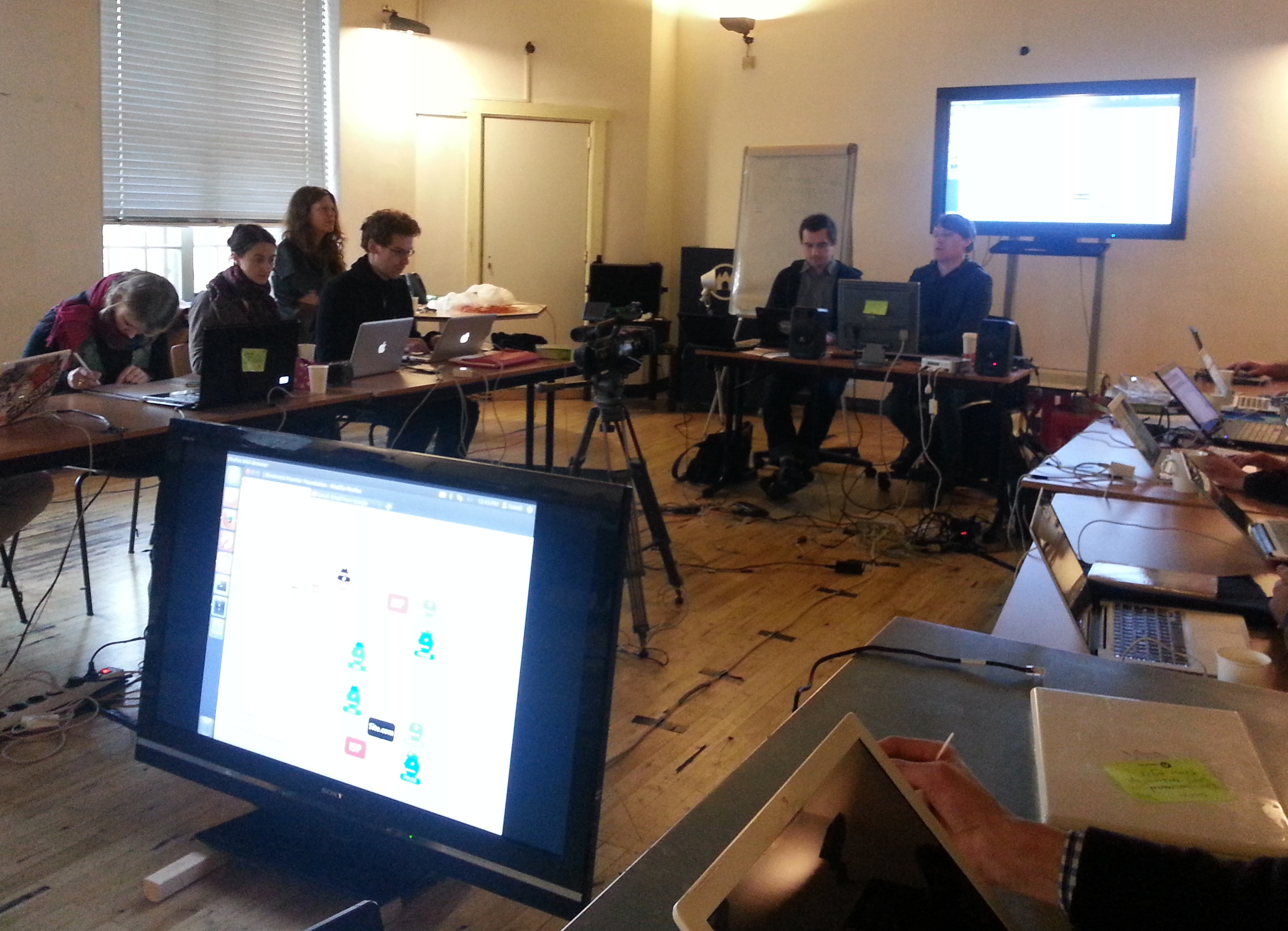
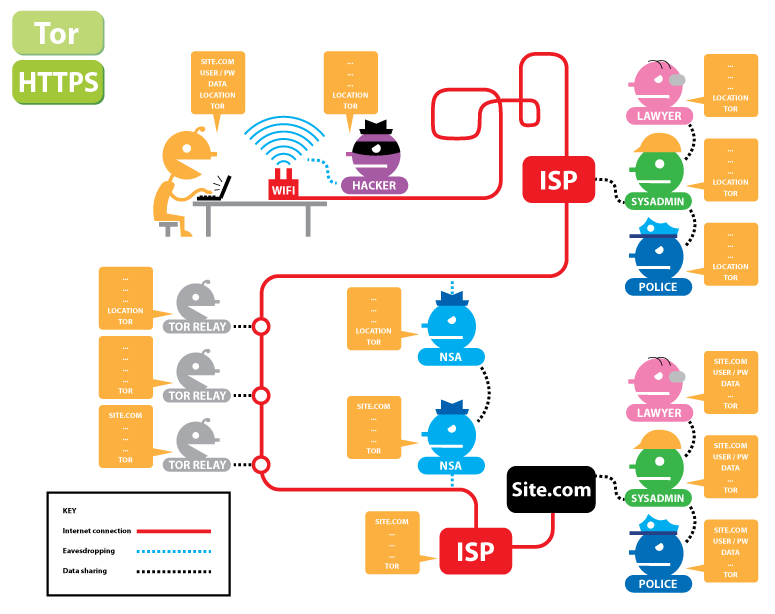
The final day was about how to protect yourself a bit better online (a lot of the participants had started to feel “naked” after the Wifi snooping sessions of a day earlier. We discussed how encryption helps you with your basic human right to privacy while in the public space called the network and looked at the difference between anonimity and encryption. They explained HTTPS and Tor with this live diagram from the Electronic Frontier Foundation (EFF):
Tor and HTTPS
They also made us download the the Tor Browser Bundle and discussed a few handy Firefox addons:
User Agent Switcher allows you to change your browser user agent so that the webpage thinks you are using a different device.
HTTPS everywhere to force your browser to use HTTPS whenever it is available.
DoNotTrackMe helps to protect you against companies tracking you online (they want to do sentiment-analysis and try to pre-empt your behaviour.
We looked at setting up a VPN which is great tool to protect you against Wifi sniffing and to quickly . They showed us ipredator and OpenVPN and have inspired me to finally turn on the VPN capabilities of my VPN server.
Finally they shared a link to their Cryptoparty Handbook. This 400 page book was written in four day sprint and provides a comprehensive overview of everything that we learned (and much more).
For many participants this workshop was a truly transforming experience, hopefully changing their relationship to technology forever. I need to thank Dorien Zandbergen for masterminding this and making it possible!